
CMMS Software That Runs on Machine Condition, Not the Calendar
Nulogy Maintenance triggers and prioritizes work from real machine signals, not a fixed calendar. Built into Smart Factory, so machine condition, downtime, and work orders live in one system.
- Catch failures by condition before they cost you a shift
- Spend labor where it prevents failures, not where the calendar says
- Tie every fix to availability and OEE, so maintenance proves its value
See Nulogy Maintenance in Action
manufacturing leaders
Unplanned downtime doesn't just disrupt your shift; it hits your costs, your output, and your customers. Nulogy Maintenance gives us the visibility to stay ahead of it. We know what our machines need, when they need it, and we can see exactly how that's improving our performance.
From Calendar Guesswork to Machine Condition
Calendar-based maintenance fires on a fixed schedule while real failures happen in between. Here is the difference condition-based maintenance makes on the floor.
- ✕Reactive firefighting when failures hit between scheduled PMs
- ✕Calendar PMs that over-service healthy assets and miss the hard-run ones
- ✕Maintenance data siloed from production, so work cannot be prioritized
- ✕No way to prove the work improved availability or OEE
- ✕Another system and another vendor for every add-on
- Work triggered by real machine condition and usage, not a fixed date
- Orders prioritized by what is actually at risk on the line
- One system with production monitoring, no siloed data or extra vendor
- Right-sized effort, so healthy assets are not over-serviced
- Every fix tied to availability and OEE, so you can prove the impact
See What Your Machines Need, Before They Go Down
Calendar PMs act when the schedule says to. Nulogy Maintenance acts when the machine says so. Condition and usage signals from your line trigger and prioritize work in real time, on the same platform as production monitoring and OEE, so you act before a stop instead of after.
View Demo
Trusted by Leading Manufacturers
How Condition-Based Maintenance Works
Nulogy Maintenance runs on the production-monitoring platform your floor already uses, so condition signals, work orders, and asset health live in one system. Here is how a maintenance order goes from machine signal to proven recovery.
Asset Health Overview
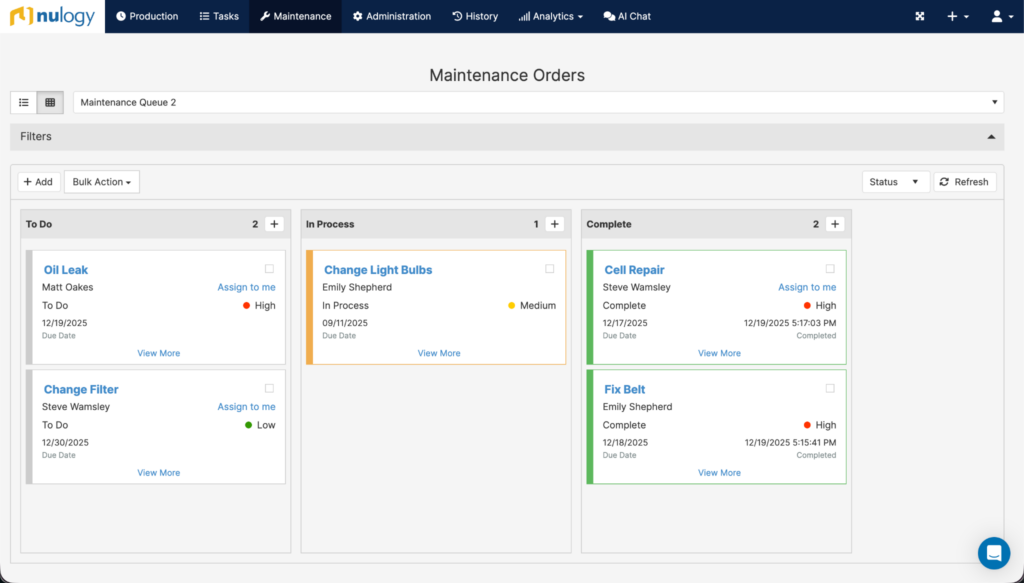
See every asset, its condition, and all open work in one view. Monitored production assets, monitored maintenance assets, and calendar-only assets live together.
Condition-Based Triggers
Vibration, temperature, runtime, and meter readings create maintenance orders automatically when a threshold is crossed, not on a fixed date.
Prioritized Work, on Mobile
Orders are ranked by asset criticality and line impact. Technicians get the queue, instructions, checklists, and parts on a mobile app, even offline.
Parts and Inventory Visibility
See parts across every site before placing an order, and auto-sync consumption so inventory stays accurate and emergency purchases drop.
Reliability and OEE
Downtime, reliability, and OEE are tracked on the same data, so you can prove how each fix improved performance.
Plan and Calendar PM
Run PM schedules, templates, and recurring tasks alongside condition-based triggers, all in one system, so nothing lives in two tools.
Nora, the AI assistant built into Maintenance, answers questions about any of these views in plain English and can create maintenance orders.
Go deeper: Smart Factory Platform· OEE Tracking Software· Production Monitoring
Ask Your Maintenance Data a Question
Nora is the manufacturing AI assistant built into Nulogy Smart Factory and Maintenance. Ask about open and overdue maintenance orders or downtime trends in plain English, and Nora answers from live plant data. She can also create a maintenance order with the right details and instructions, so the next step happens without leaving the conversation.
See everything Nora does in Smart Factory- Filler bearing, vibration trigger, 2 days late
- Capper PM, calendar, 1 day late
- Conveyor inspection, usage trigger, 4 hours late
Why Teams Choose Nulogy Maintenance
Standalone CMMS tools can schedule work and track assets. What they can’t do is connect maintenance to what’s actually running on the line. That connection is the whole point.
Production Context AI
The only CMMS AI with production context. Nora knows which customer orders are at risk when a line goes down, so the team works the failures that matter first.
"Knowing a motor faulted is useful. Knowing it’s running your biggest customer’s order that ships tomorrow is a different conversation."Machine Connection
Built on a production monitoring system. Condition and usage triggers fire from the signals your floor already generates. No separate hardware, no bolt-on IoT project.
The sensors you use for production are the same ones that trigger maintenance.Data-Driven Decisions
Repair cost and downtime loss weighed against production contribution. Nulogy is the only CMMS that can calculate both sides, so the repair-or-replace call is backed by data, not instinct.
Tie maintenance work directly to OEE, and prove the return.Fewer Systems
Maintenance lives inside the same platform as production, so there’s no extra system to learn, no integration project, and no added vendor. One source of truth for downtime, work orders, and asset health.
Most CMMS capabilities, without adding more systems.What Could Condition-Based Maintenance Save You?
Estimate the annual downtime you could recover by moving from calendar PM to condition-based maintenance. Enter your numbers to see the opportunity.
The full calculator also models technician efficiency and spare-parts savings. Industry assumption: 30% downtime reduction (Plant Engineering, Deloitte, Aberdeen Group).
Standalone, or Inside Smart Factory
Nulogy Maintenance works on its own as your CMMS, and it’s strongest as part of the wider system. Start where you are today.
For Teams Moving Beyond Reactive
If you’re not running Nulogy yet, start with Maintenance as a single system to plan PMs, manage work orders, and track asset health, so your team stops firefighting and starts protecting uptime. When you’re ready, it grows into the full Manufacturing Operating System.
For Plants Already Running Nulogy
If you already run Smart Factory, the sensors you use for production monitoring are the same ones that trigger maintenance. It’s native, not bolted on, so you can tie PMs directly to OEE with no new hardware or integration project.
Part of the Manufacturing Operating System
Maintenance is one capability in Nulogy’s Manufacturing Operating System (MOS), the connected foundation where production, maintenance, and AI work on the same data.
Implementing Nulogy Maintenance
Connect Your Machines and Sensors
Nulogy Maintenance runs on the production-monitoring platform and connects to your existing equipment and sensors. No rip-and-replace required. Start capturing machine condition and usage in days, not months.
Capture Condition and Usage
Machine condition, usage, and operator requests flow into one system. Vibration, temperature, runtime, and meter readings are captured automatically, with no spreadsheets and no manual entry.
Trigger Work and Prove Recovery
Maintenance orders are triggered and prioritized by line impact, and downtime, reliability, and OEE track the result, so your team acts before a failure and proves each fix improved performance.
What a CMMS Does, and Where It Stops
A CMMS (computerized maintenance management system) is software that manages a plant’s maintenance work orders, assets, schedules, and history in one place, instead of spreadsheets, paper, and tribal knowledge. Done well, it standardizes preventive maintenance and keeps work from slipping. The gap is what happens when the schedule and the real condition of the machine disagree.
What a Good CMMS Does Well
- Standardizes preventive maintenance across the plant
- Reduces missed and skipped work
- Improves technician efficiency and record-keeping
- Works best when schedules are accurate and data entry is consistent
Where Most CMMS Tools Stop
- Condition-based monitoring is usually optional or a paid add-on
- Machine data needs extra sensors and integration work
- Prioritization stays calendar and rules based, not line-impact based
- "Work completed" counts as success; the impact is assumed, not verified
Nulogy Maintenance is a CMMS built into production monitoring, so condition-based triggers, line-impact prioritization, and verified OEE recovery are how it works by default, not an add-on. That’s how you move from logging work to proving it cut downtime.
Related Resources
Frequently Asked Questions
What is a CMMS?
What is condition-based maintenance?
How is Nulogy Maintenance different from a traditional CMMS?
Can I use Nulogy Maintenance as a standalone CMMS?
How are maintenance orders triggered in Nulogy?
Do I need to add sensors or replace equipment?
Does Nulogy Maintenance use AI?
Get Started with Nulogy Maintenance
Move from calendar guesswork to condition-based maintenance, and prove the uptime you win back.